Maintenance only. Runs beside your property software.

Maintenance, handled from request to payout.

Residents report a problem with photos. You send one of your own vendors. Everyone agrees on a time, and the vendor is paid when you approve the work. One record, start to finish.

  • $0 a month to start
  • Vendors keep 100% of their price
  • Free for residents
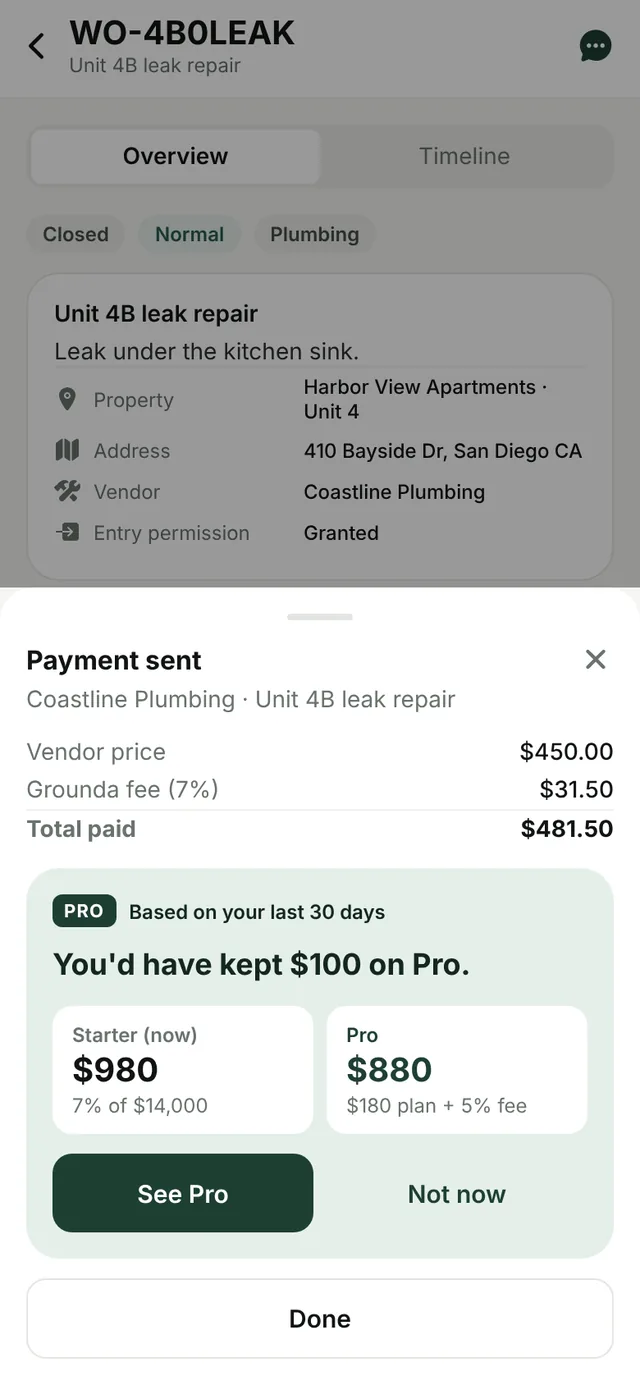
Grounda app showing a closed plumbing repair and its payment receipt: vendor price $450.00, Grounda fee $31.50, total paid $481.50.
$0per month on Starter. You pay only when a vendor is paid.
100%of the vendor's price goes to the vendor.
Bank or cardPayments run through Stripe, with bank transfer (ACH) offered first.
Your vendorsGrounda is not a marketplace. You invite the people you already trust.

Why Grounda

One job, done properly: maintenance.

Rent, leases and accounting already have good software. Maintenance is the part that still runs on phone calls, group texts and a spreadsheet. Grounda does only that part, so you can keep the system you have for everything else.

What Grounda does

  • Requests with photos, from residents or your team
  • Dispatch, scheduling and a message thread per job
  • Vendor paperwork: license and insurance on file
  • Vendor payment and a receipt on every job

What it leaves to your other software

  • Rent collection
  • Accounting and owner statements
  • Leasing, listings and tenant screening

Grounda does not sync with other property software today. You run it side by side.

How it works

From "something's broken" to "paid" in four steps

  1. 1

    Report

    A resident scans your QR poster or opens their link, describes the problem, and adds photos and the unit.

  2. 2

    Triage and dispatch

    AI suggests a category and urgency. You decide, then offer the job to a vendor from your own list.

  3. 3

    Schedule and fix

    The vendor proposes a time and the resident confirms it. Everyone sees when the vendor is on the way, on site and done.

  4. 4

    Verify and pay

    You check the finished work and pay through Stripe. The vendor gets their full price and the job keeps its receipt.

Features

Everything a maintenance desk runs on

Built around the four people on every repair: you, the resident, the vendor and the owner.

Intake

Requests that arrive ready to act on

Residents send a description, photos and the exact unit. AI suggests a category and urgency so the urgent ones surface first. It only suggests. A person always makes the call.

  • QR poster or link for each building
  • You approve each resident before they can report
  • Photos on every request
  • Recurring work on a schedule
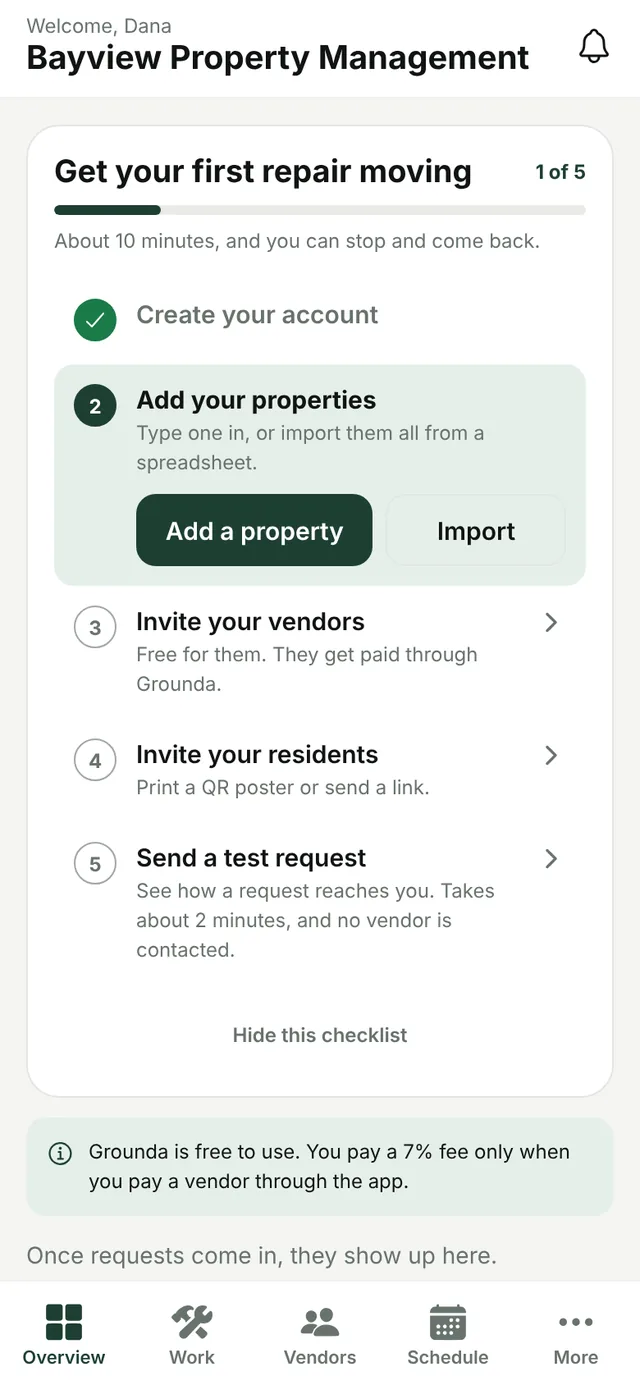
Grounda setup checklist in the app: create your account, add your properties, invite your vendors, invite your residents, send a test request.
Vendors

Your vendors, with their paperwork on file

Invite the professionals you already use. A short setup checklist gets them ready for work, and their license and insurance are kept on file with expiry dates, so you hear about it when a required one lapses.

On the job

Scheduling, messages and change orders

Vendors propose times and residents confirm. Each job has its own thread. If a job grows, the vendor sends a change order and you approve it before any extra cost.

Payments

Pay by bank or card, with a receipt

Payments run through Stripe. Bank transfer (ACH) is offered first and cards work too. The vendor is paid to their bank and the fee is shown before you pay.

Feedback

Private ratings from residents

After you verify a job, the resident can rate the vendor. Ratings stay private to you, so you learn who does good work without a public review board.

Setup

Import your properties from a spreadsheet

Paste rows from Excel or Google Sheets, or pick a CSV file. You see a preview of what will change before anything is saved.

Updates

Nobody has to chase a status

In-app and email notifications tell managers and residents when a job is assigned, scheduled, finished and paid. A full activity log shows who did what and when.

Pro

The tools owners ask for

Set a spending limit for your company or for a single property. Jobs over the limit go to the owner for approval before work starts. Owners also get a monthly email report of what was fixed and what it cost.

  • Owner approvals and spending limits
  • Owner reports and a monthly owner email
  • 5% per-job fee instead of 7%
  • Report by Text Coming soon

App screens on this page show sample data.

Built for everyone on the job

Each person sees only what they need

Property managers

Every open request across your properties, ranked by urgency. Dispatch, approve and pay from one screen.

Create a manager account

Service professionals

Job offers from the managers you work with, your schedule in one place, and your full price paid to your bank. Always free.

Join as a vendor

Residents

Report a problem in about a minute, confirm a visit time that works, and follow the repair until it is done. Always free.

Sign in

Pricing

Start free. Move to Pro when it saves you money.

The property manager pays Grounda. Vendors receive their full price, and residents never pay.

Starter

$0 / month

Plus a 7% fee on each job you pay through Grounda.

  • Requests, photos and AI triage
  • Your vendors, scheduling and messages
  • QR invites and spreadsheet import
  • License and insurance tracking
  • Payments by bank or card
Start free

Pilot

60 days no fee

A trial of the whole product, set up with you by our team.

  • 0% per-job fee during the pilot
  • The Pro tools included
  • Help getting properties and vendors in
  • Moves to Starter after 60 days unless you choose Pro
Ask about a pilot
Service professionals: free. You keep 100% of your price.
Residents: free. Always.

Which plan costs less for you?

Move the sliders to match a typical month.

Starter $980 7% fee, no plan
Pro $880 $180 plan + 5% fee

Pro saves you $100 a month.

Example on Starter: for a $200 repair you pay $214 and the vendor receives $200. Payments are processed by Stripe, and bank transfers can take a few business days to clear. Pro and Starter are bought and managed on the web.

Compare

How Grounda fits next to the big platforms

Buildium, AppFolio, DoorLoop and TenantCloud are full property management suites. Grounda is not. Here is an honest look at when each one fits.

Grounda Buildium AppFolio DoorLoop TenantCloud
What it is Maintenance only Full suite: accounting, maintenance, leasing Full suite, priced per unit Full suite, priced per unit Full suite for landlords and managers
Published starting price $0 a month, plus 7% per paid job From $65 a month (Essential) [1] From $1.49 per unit a month (Core) [2] From $2.50 per unit a month (One) [3] From $15 a month, billed yearly (Starter) [4]
Minimums and caps None on Starter. Pro has a $99 monthly minimum. Not stated. Prices are "starting at". [1] 50-unit minimum on Core, plus a minimum spend [2] Minimum spend and units apply. Amounts not published. [3] Leases capped at 10, 30 or 60 by plan [4]
Free to start Yes, a free plan 14-day free trial [1] Not listed on the pricing page [2] Not listed on the pricing page [3] 14-day trial, no free plan [4]
Maintenance tools listed Requests, AI triage, dispatch, scheduling, vendor paperwork, vendor payment Task and work order management, projects, inspections [1] Work order management, inspections and unit turns [2] Maintenance and work orders, vendor portal [3] Unlimited online maintenance requests, ServicePro tools [4]
Rent, accounting, leasing No. Use your existing software. Yes Yes Yes Yes

If you use Buildium

Where it may fall short: every plan is a monthly subscription for the whole suite, starting at $65. On Essential, outgoing bank payments are listed at $0.99 each and live phone support starts on Growth. [1]

Where Grounda fits: if maintenance is the part you want handled better, Starter adds no monthly bill and you can run it next to Buildium.

If you are looking at AppFolio

Where it may fall short: the Core plan lists a 50-unit minimum and a minimum spend, so a smaller portfolio may not qualify. [2]

Where Grounda fits: there is no unit minimum on Starter. A manager with 12 doors gets the same request-to-payout flow as one with 1,200.

If you are looking at DoorLoop

Where it may fall short: pricing is per unit with minimums that are not published, and the Maintenance Ops Agent is listed under Multiply, an invite-only plan. [3]

Where Grounda fits: AI triage is included on every plan, the free one too, and you pay only when a vendor is paid.

If you use TenantCloud

Where it may fall short: it is the lowest priced of the four, but plans cap the number of leases (10, 30 or 60), so cost steps up as you grow. [4]

Where Grounda fits: Starter has no caps on properties, residents or requests, so the price only follows the work you actually pay for.

Where they are stronger than Grounda

All four collect rent, keep your books, and handle leasing, and Grounda does none of that. They are also long-established products with larger teams. If you want one system for everything, choose one of them. Grounda is for managers who want maintenance and vendor payment handled well, alongside whatever they already use.

  1. Buildium pricing page
  2. AppFolio pricing page
  3. DoorLoop pricing page
  4. TenantCloud pricing page

Competitor details come from each company's public pricing page as read on November 15, 2026. Plans and prices change, so check their pages for current terms. Product names are trademarks of their owners. Grounda is not affiliated with these companies and does not integrate with them today.

Payments by Stripe

Card and bank details are handled by Stripe. Grounda never sees or stores full card numbers.

Access by role

Residents, vendors and managers only see the jobs and details that involve them.

A record you can rely on

Important actions are logged, so you always know who approved what and when.

FAQ

Common questions

Does Grounda replace my property management software?

No. Grounda handles maintenance and vendor payment only. Keep your current software for rent, accounting and leasing. The two do not sync today, so you run them side by side.

Who pays the fee?

The property manager, on top of the vendor's price, and only when a job is paid through Grounda. It is 7% on Starter and 5% on Pro, and it is shown before you pay. Vendors receive their full price and residents never pay.

When is Pro worth it?

Pro costs $1.50 per unit each month with a $99 minimum, and lowers the fee from 7% to 5%. At the $99 minimum it pays for itself once you pay vendors about $4,950 a month. The calculator above shows your own numbers.

Can I bring my own vendors?

Yes. Invite the service professionals you already work with by email. They create a free account, finish a short setup checklist, connect Stripe for payouts, and start receiving your jobs.

How do residents join?

Print a QR poster for a building or send a link. Residents who scan it sign up and ask to join, and you approve each one before they can send requests.

Do I need to install anything?

No. Grounda runs in the web browser on your phone, tablet or computer. Apps for the App Store are on the way.

Can residents report by text message?

Not yet. Report by Text is built and will be switched on once our carrier registration is complete. It will be part of Pro.

Does Grounda do the repairs?

No. Grounda is the software that connects you. Service professionals are independent businesses responsible for their own work, licenses and insurance.

Can I get refunds?

Yes. Managers can issue a refund on a payment from inside the app, which reverses the payout to the vendor.

Put your maintenance on solid ground.

Set up your first property in about ten minutes. It is free until a job gets paid.